
You’ve probably heard that your business needs SEO. Maybe someone mentioned it in passing, or you’ve noticed a competitor showing up on Google when you don’t. But when you search for what SEO actually means, you end up buried in jargon that assumes you already know what you’re doing.
This guide is a plain, practical explanation of on-page SEO for small businesses and a starting point for owners doing it themselves. This is a straightforward breakdown of what it is, why it matters for your business, and exactly where to begin.
What Is On-Page SEO?
On-page SEO for small businesses is the process of improving the content and structure of your website pages so that search engines like Google can understand what those pages are about and show them to people who are searching for what you offer.
Think of it this way: Google can’t read your website the way a human does. It scans your pages looking for signals, things like the words you use, how you structure your content, and the titles you give your pages. All these to figure out what each page is about and whether it’s worth showing to someone who just searched a related term.
On-page SEO is about making those signals as clear and useful as possible.
On-page SEO sits alongside two other branches of SEO: technical SEO (which covers the behind-the-scenes performance of your site, like load speed and mobile compatibility) and off-page SEO (which covers external signals, primarily backlinks from other websites). The three work together, but on-page is the best place to start because it’s entirely within your control and directly tied to the content you already create.
Why Does It Matter for Your Small Business?
On-page SEO matters for small businesses because most people looking for what you sell or offer are searching for it online first, and if your website isn’t signalling clearly to Google what you do and who you serve, it won’t show up when those searches happen.
The good news is that on-page SEO compounds over time. Unlike paid advertising, where visibility stops the moment you stop paying, a well-optimised page can continue attracting traffic for months and years after you publish it. For a small business with a limited marketing budget, long-term, low-cost visibility is genuinely valuable.
It’s also worth knowing that as AI-powered search becomes more prominent, tools like Google’s AI Overviews, ChatGPT, and Perplexity are increasingly how people find answers online, and well-structured, helpful content is becoming even more important. AI tools prefer clear, authoritative pages that directly answer questions. The fundamentals of good on-page SEO are the same fundamentals that make your content visible in both traditional and AI-powered search.
On-page SEO isn’t about tricking Google. It’s about making it easy for Google to understand what your page is about, and for your customers to trust what they find.
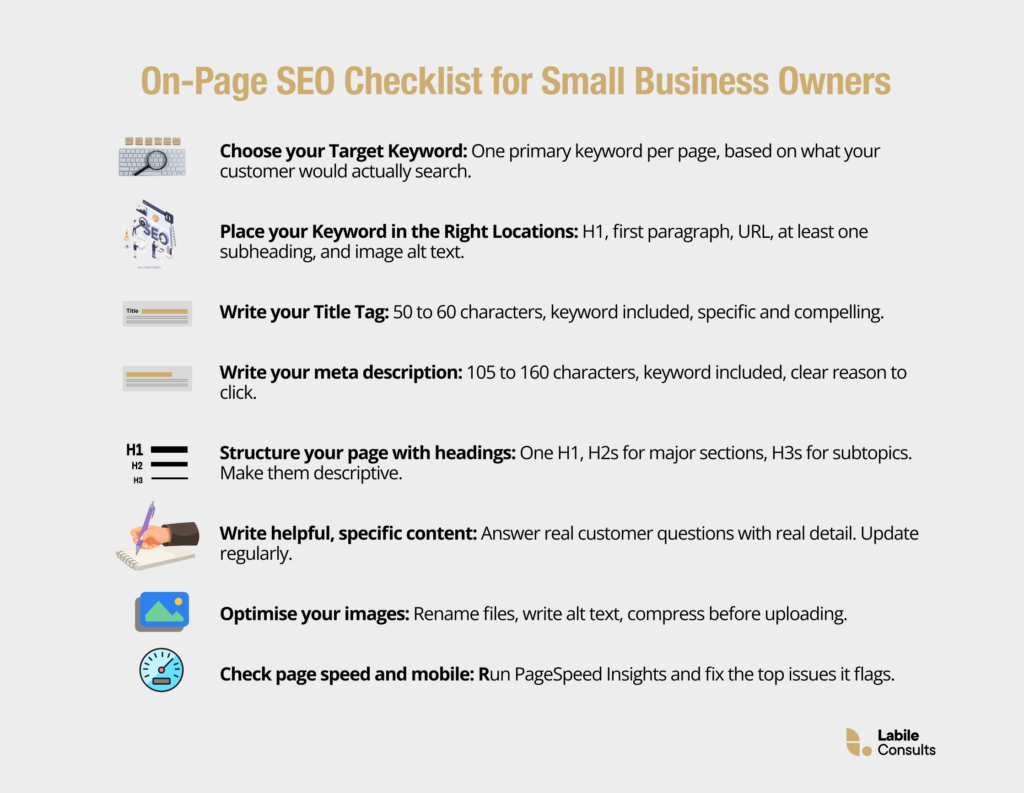
How to Do On-Page SEO for Your Small Business: 8 Practical Steps
Here’s how to do on-page SEO in a way that’s manageable for a small business. You don’t need to implement all of this at once. Start with one page, your homepage or your most important service page, and work through each step.
1. Choose Your Target Keyword
Every page on your website should be built around one primary keyword, the specific phrase your target customer is most likely to search for when looking for what that page offers. For a florist in Manchester, that might be “wedding florist Manchester.” For an accountant targeting new businesses, it might be “small business accountant London.”
To find your keyword, start simple. Type what you do into Google and look at what comes up. The suggestions Google shows as you type (the autocomplete) are real searches people are making. Free tools like Google Keyword Planner or Ubersuggest can help you check search volumes and find variations. Look for keywords that are specific enough to match real customer intent. The more specific, the less competition and the more qualified the traffic.
Once you have your target keyword, every other step in this list flows from it.
2. Place Your Keyword Strategically
Once you have your keyword, you need to place it in the right locations on the page. This is one of the most fundamental parts of website content optimisation and one of the most commonly missed by small business owners who write their pages without SEO in mind.
Your keyword should appear in:
- The page title (H1) — the main heading visible at the top of your page
- The first paragraph of your content — ideally within the first 100 words
- At least one subheading (H2 or H3)
- The URL of the page (e.g., yourbusiness.com/wedding-florist-manchester)
- The meta description (more on this below)
- The alt text of any relevant images
Do not overdo it. If a keyword appears in every other sentence, it reads unnaturally, and Google recognises this as keyword stuffing, which can actually harm your rankings. Use the keyword where it fits naturally, and use related phrases and synonyms to fill in the rest.
3. Write a Clear Title Tag and Meta Description
Meta descriptions and title tags are the first things someone sees in a search result before they click. They are also two of the clearest signals you can send to Google about what your page is about.
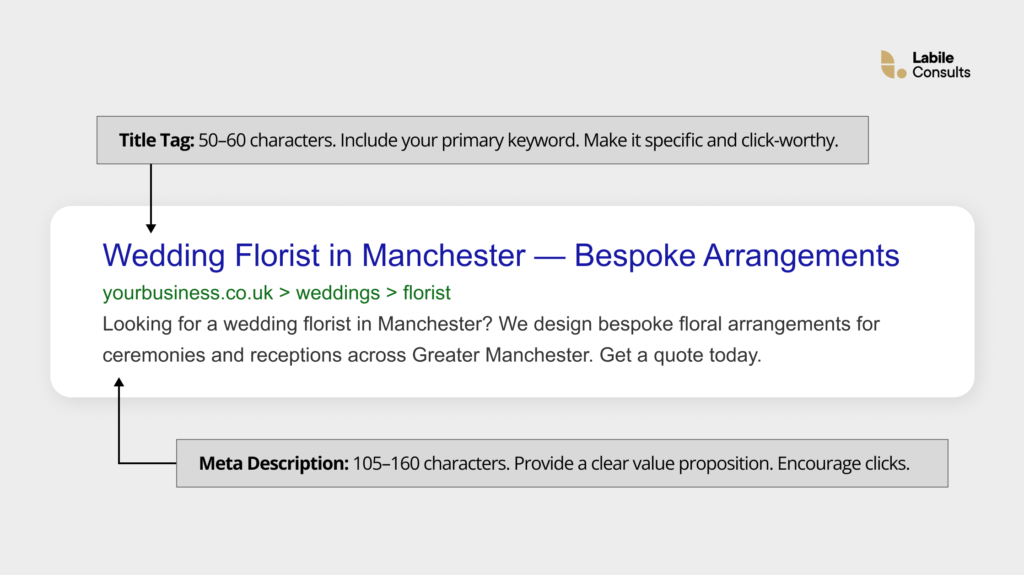
Your title tag is the clickable headline in search results. Keep it between 50 and 60 characters, include your primary keyword, and make it specific enough to stand out. “Wedding Florist in Manchester, Bespoke Arrangements” is more compelling and more informative than “Home, Sarah’s Flowers.”
Your meta description sits below the title in search results. It doesn’t directly affect your ranking, but it significantly affects whether someone clicks. Aim for 105 to 160 characters, include your keyword, and give the reader a clear reason to choose your page over the others on that results page. Think of it as a very short ad for your page.
Writing strong meta descriptions and title tags is one of the quickest wins in on-page SEO for small businesses because most small-business websites either leave them blank or use default placeholder text that does little to attract clicks.
4. Structure Your Page with Headings
Headings (H1, H2, H3, and so on) do two jobs at once: they make your page easier for human visitors to scan and navigate, and they help Google understand the structure and priority of your content.
Every page should have exactly one H1, the page’s main title. Under that, use H2s for your major sections and H3s for subsections within those. Think of it like a well-organised report: the H1 is the title, H2s are chapter headings, and H3s are sub-sections within chapters.
For on-page SEO for small businesses, the practical tip here is to make your headings descriptive and keyword-informed rather than clever or vague. “How We Work” tells Google very little. “How Our Manchester Wedding Florist Process Works” tells Google exactly what the section covers and signals relevance for a search around that topic.
5. Write Helpful, Specific Content
Website content optimization is not just about keywords. The actual substance of your content, how useful it is, how clearly it answers the questions your customers are actually asking, is one of the strongest signals Google uses to evaluate your pages.
Google has been explicit about this through what it calls E-E-A-T: Experience, Expertise, Authoritativeness, and Trustworthiness. In plain terms, it wants to show content that was written by someone who actually knows what they’re talking about and can back it up. For a small business, this is actually an advantage: your real-world experience, your specific location, your genuine customer stories. These are things a generic AI-written page cannot replicate.
Practical ways to strengthen your content:
- Answer the most common questions your customers ask you directly on the page
- Use specific language (real places, real services, real outcomes), rather than generic descriptions
- Include original details (a before-and-after, a case study, a testimonial with context)
- Keep paragraphs short and scannable, especially on mobile
- Update pages regularly, Google favours content that stays current
6. Add Internal Links
Internal linking, adding links from one page on your website to another, is a simple yet powerful part of website content optimization that many small-business websites overlook entirely.
Internal links do two things. For your visitors, they create a natural path through your site, connecting related content and making it easier to find what they need. For Google, they signal which pages on your site are related and help it discover pages it might not have found on its own.
When you add an internal link, the anchor text, the actual words the link is placed on, matters. Avoid generic phrases like “click here” or “read more.” Instead, use descriptive text that tells both the reader and Google exactly what the linked page covers. “Learn more about our wedding floristry packages in Manchester” is far more useful than “click here.”
7. Optimise Your Images
Images add context and keep readers engaged, but out of the box, they contribute very little to your SEO, because Google can’t see images the way humans can. Two small changes make a significant difference.
First, rename your image files before uploading them. An image title like, “floral-arrangement-manchester-wedding.jpg” tells search engines far more than “IMG_4821.jpg.”
Second, write alt text for every image, a short description of what the image shows. Alt text serves two purposes: it helps visually impaired users who rely on screen readers, and it gives Google another clear signal about your page’s content. Keep alt text descriptive, specific, and natural. If your keyword fits, include it, but don’t force it.
A bonus: compressing your images before uploading them reduces file size and speeds up page loading, which is another ranking factor in its own right.
8. Check Your Page Speed and Mobile Experience
Two final technical factors sit within the on-page SEO bracket and are worth a quick check, even if you’re not a technical person. Page speed, how quickly your pages load, is a direct ranking signal. If your pages take more than three seconds to load, a significant proportion of visitors will leave before they even see your content, and Google knows this.
Mobile friendliness matters just as much. Google primarily uses the mobile version of your site when deciding how to rank it (this is called mobile-first indexing), so if your site is hard to read or navigate on a phone, your rankings will suffer regardless of how well your content is optimised.
To check both, run your pages through Google’s free PageSpeed Insights tool. It gives you a score for both mobile and desktop performance and flags specific issues to fix. Most small business owners are surprised by what they find.
So, Where Do You Start?
On-page SEO for a small business is not something you need to perfect overnight. The most effective approach is to pick your most important page, the one you most want customers to find, and work through the eight steps above before moving on to the next.
The compound effect of well-optimised pages builds slowly, but it builds reliably. Small businesses that invest consistent effort in how to do on-page SEO correctly, rather than chasing shortcuts, tend to see the most durable results over time. You don’t need a big budget or a technical background. You need clarity about who you’re trying to reach, patience to do the work properly, and a checklist to keep you on track.
You now have all three.
Want Help Getting Your On-Page SEO Right?
If you’re not sure where your website currently stands, or if you’d rather have an expert handle your website content optimisation while you focus on running your business, Labile Consults can help.
We work with small businesses and growing brands to build SEO strategies that are grounded in your goals, your audience, and your specific market. Book a free consultation today, and let’s build something that actually ranks.