
If you’ve been searching for how to hide likes from Instagram, the good news is that it only takes seconds, whether you want to hide likes on a single post or your entire page going forward. Here’s exactly how to hide likes from Instagram, no matter which one you need.
One thing to keep in mind before we get into how to hide likes from Instagram: this only changes what your audience sees. As the account owner, your real numbers stay visible to you for tracking and reporting.
Why Small Business Owners Hide Likes on Instagram
Before we get into how to hide likes from Instagram, here’s a quick word on why this matters for a business page specifically. When you run a business account, your like count is public. Anyone, including potential customers and competitors, can glance at a post and use that number to decide whether your brand is “worth” engaging with. That’s a problem when:
You’re posting genuinely good content that just hasn’t found its audience yet. You’re testing new formats and don’t want a slow start to affect how the page is perceived. You’d rather people judge your product or service on its own merit, not on a number. You want to protect the confidence of your team, who are putting in the work on content
Hiding likes won’t fix a performance problem. It just stops a low number from becoming a customer’s first impression of your brand. That’s exactly why so many small business owners look up how to hide likes from Instagram before they even launch a new page.
How to Hide Likes From Instagram Before You Post
If you know ahead of time that you don’t want the like count showing, you can switch this on before the post even goes live. This is the most common way small business owners hide likes from Instagram, since it saves you from having to go back and edit the post later.
- Open Instagram and start creating your post as usual: upload your photo or video, apply your edits, and write your caption.
- On the final screen, before you tap “Share,” scroll down to find “Advanced Settings” or “More Options.”
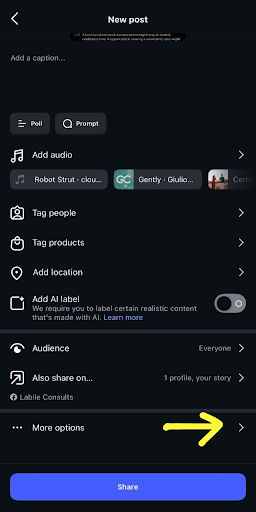
- Inside Advanced Settings, find the option “Hide like and view counts on this post.“

- Toggle it on.
- Tap “Share” to post as normal.

That’s it. Your post goes live, but the total like count stays hidden from everyone viewing it; you’ll still be able to see it on your end. This is the fastest way to hide likes from Instagram if you’re planning your content in advance.
How to Hide Likes From an Instagram Post You’ve Already Published
Maybe the post has been up for a week, and you’re only just noticing that the numbers don’t match the quality. No problem, you don’t need to delete it. You can still hide likes from Instagram after the fact.
- Go to your profile and find the post you want to edit.
- Tap the three dots (⋯) in the top-right corner of the post.

- Select “Hide Like Count.”

- Confirm, and that’s it; the like count disappears from public view immediately.
One thing worth knowing is that Instagram doesn’t have a bulk option for this. If you’re going back through older content to hide likes from Instagram, you’ll need to do this one post at a time. It’s a bit of admin, but for the posts that matter, it’s worth it.
How to Hide Like Counts From Your Entire Instagram Feed
If you’d rather set this once and not think about it per post, you can also hide likes from Instagram globally, both for your own posts and for what you see when you scroll.
- Open Instagram and go to your profile.
- Tap the hamburger menu icon (three lines) at the top-right corner of your screen.
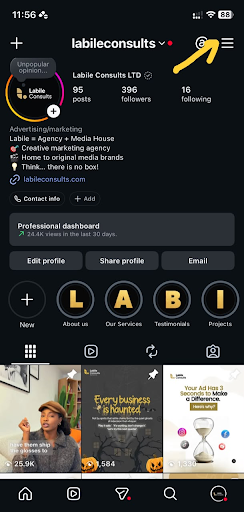
- Click on “Settings,” then go to “What you see” and tap “Like and share counts”.

- Turn on “Hide like & share counts.”
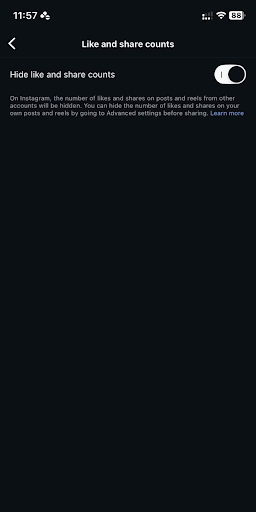
This is a good option if your whole team is trying to shift focus away from vanity metrics and onto content quality, saves, shares, and DMs, which is honestly where the algorithm’s attention is anyway these days. It’s also the simplest way to hide likes from Instagram across the board without managing each post individually.
How to Hide Likes From Instagram Reels
If Reels are part of your content strategy, and they probably should be, note that they have their own like-visibility setting, separate from your regular feed posts. Here’s how to hide likes from Instagram Reels specifically:
- Go to your profile and open the Reels tab.

- Open the specific Reel.
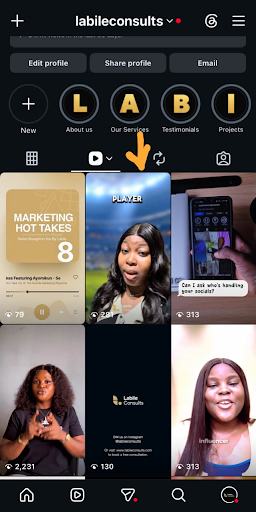
- Tap the hamburger menu at the bottom corner of your screen.

- Select “Hide likes” (you may see “Manage” first, depending on your app version).
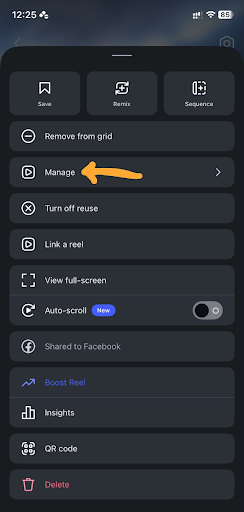
- Select Hide likes (you may see “Manage” first, depending on your app version).

What to Know Before You Hide Your Likes From Instagram
- It’s reversible: If you change your mind, follow the same steps and select “Unhide like count.” Nothing is lost; Instagram doesn’t delete the underlying likes; it just stops displaying the number.
- You can still see your own numbers: Choosing to hide likes from Instagram only affects what your audience sees. As the account owner, you’ll always have access to the real count for your own tracking and reporting.
- It doesn’t hide who liked the post: People can still tap into the “Liked by [Joel] and others” list. It only hides the total count.
- It’s not a substitute for a content strategy: Hiding likes gives your content some breathing room, but it won’t fix an inconsistent posting schedule or a caption that isn’t doing its job. If your calendar needs work, this guide to building a social media content calendar is a good next step.
Should You Hide Your Likes on Instagram?
There’s no single right answer here; it depends on your brand and your audience. But as a general rule, it’s worth hiding likes from Instagram when you’re actively growing a new page, testing content formats, or building in a niche where numbers get compared a lot. It’s less necessary once your engagement is consistently strong, since a healthy like count can actually work as social proof at that point. Either way, this is exactly the kind of decision that’s easier to make with the right social media marketing services behind your page, someone watching the numbers so you don’t have to guess.
You Run the Business. Let Labile Run Your Social Media Page.
Now that you know how to hide likes from Instagram, here’s the bigger picture worth sitting with: you didn’t start your business to spend your evenings tweaking settings, refreshing your page, and wondering why last week’s post didn’t land. You started it to build something you believe in and watch it grow. Every hour spent second-guessing what to post, when to post it, or how it’s performing is an hour pulled away from the work only you can do.
Talk to us today about managing your Instagram so you can focus on other important parts of your business.