
As a business owner, you probably use ChatGPT to write emails, respond to customer messages, brainstorm ideas or solve everyday business challenges. But have you noticed the sponsored links beginning to appear in some conversations? AI has officially entered the chat, and it is not surprising.
For years, businesses have relied on search engines and social media to reach potential customers. Now, ChatGPT has introduced a new way for brands to connect with people through natural conversations. These are ChatGPT Ads.
Although still relatively new, ChatGPT advertising is already changing how paid advertising works. Instead of relying solely on keyword searches, it uses the context of a user’s conversation to show relevant adverts.
If you’re new to ChatGPT Ads, this guide will explain what they are, how they work, how they differ from traditional PPC advertising, and the steps to launching your first ChatGPT ads campaign.
What Are ChatGPT Ads?
ChatGPT Advertisements are paid placements that appear within the conversational flow of a ChatGPT interaction. Rather than appearing at the top of a search engine results page, these adverts appear separately below relevant ChatGPT responses and are clearly labelled as sponsored content.
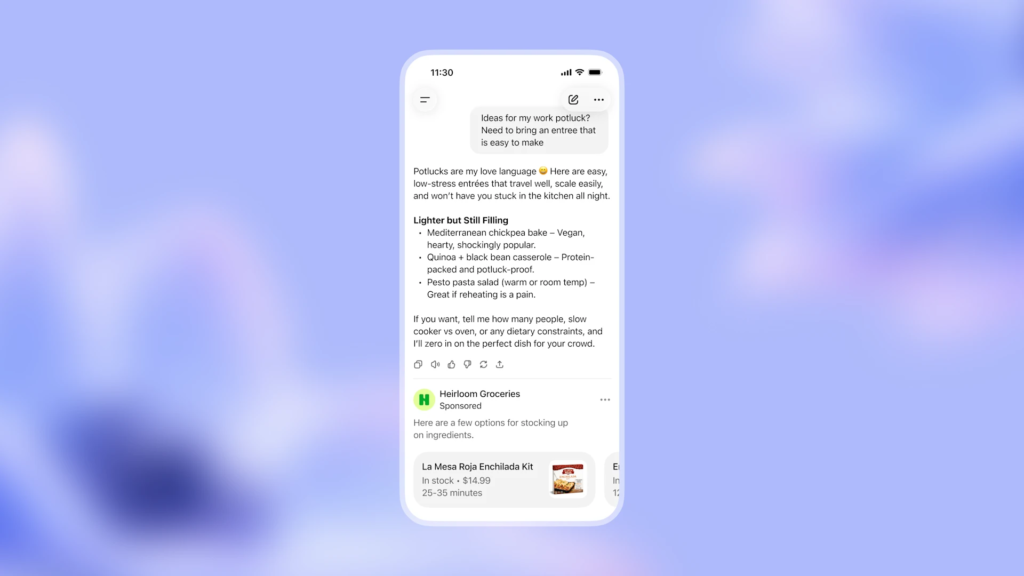
A common question business owners ask is: Do these ads influence the AI’s actual responses? The answer is no. OpenAI has stated that advertisements do not influence ChatGPT’s answers and are served through separate advertising systems.
Like traditional PPC advertising, ChatGPT Ads operate on a cost-per-click (CPC) bidding model. You are generally charged when someone clicks your advert rather than simply because it was displayed. OpenAI introduced direct CPC bidding as part of the expansion of its advertising platform, which is managed independently through the native OpenAI Ads Manager
However, this is where the similarities to standard search ads begin to diverge.
ChatGPT Ads vs Traditional PPC Advertising
To understand ChatGPT Ads, it helps to first understand where they fit within the broader world of digital advertising. Like Google Ads and Microsoft Advertising, ChatGPT Ads operate on a pay-per-click (PPC) auction and bidding model. That means you generally only pay when someone clicks your advert, rather than every time it is shown.
However, ChatGPT differs fundamentally from traditional search engines in one important way: how it decides which adverts to show. With traditional PPC platforms such as Google or Bing, advertisers primarily target keywords. If someone searches for “emergency plumber London”, businesses bidding on that keyword may have their adverts displayed.
ChatGPT Ads work differently. Instead of relying mainly on keywords, ChatGPT uses the broader conversational context to understand what the user is trying to achieve. Rather than looking only at the most recent prompt, it considers the flow of the conversation to determine whether an advert is relevant.
Imagine someone spends several minutes chatting with ChatGPT about planning a holiday to Italy. They ask about the best cities to visit, affordable accommodation, train travel, local food and budgeting tips. After that conversation, they ask:
“What’s the best way to book train tickets?”
Instead of focusing only on the words “train tickets”, ChatGPT understands the wider context. It knows the user is planning a trip to Italy, is budget-conscious and is looking for practical travel advice. That makes it possible to display a relevant advert from a train booking platform or travel company that fits the conversation.
This conversational approach allows advertisers to reach people based on intent, not just individual search terms.
| Feature | Traditional PPC (Google / Bing) | ChatGPT Ads |
| Primary Targeting | Keywords and search phrases | Conversational context and multi-turn intent |
| Matching Logic | Individual search queries | Overall conversation flow and user goals |
| User Behavior | One search at a time | Longer, multi-step interactive discussions |
| Placement Style | Search Engine Results Pages (SERPs) | Integrated below relevant AI responses |
This doesn’t automatically make ChatGPT Ads better than traditional PPC, or vice versa. They simply solve different problems. Traditional search advertising captures immediate search intent, while ChatGPT Ads can engage users within a broader conversation, making the advertising experience feel more relevant and contextual.
What You Need Before Running ChatGPT Ads
Before you create your first ChatGPT ad, it’s important to have a few essentials in place. Like any PPC campaign, good preparation can make the difference between wasting your budget and generating meaningful results.
- An Advertiser Account
The first thing you’ll need is access to an advertising platform that supports ChatGPT placements. If OpenAI Ads Manager is available in your region, create an advertiser account and complete your business and billing information. If access hasn’t rolled out to your market yet, you may need to join a waitlist or work with an approved advertising partner.
Because ChatGPT advertising is still evolving, it’s worth checking the latest availability before planning your first campaign.
N.B. The self-serve OpenAI Ads Manager beta is open to U.S. businesses, while international and UK advertisers may still encounter regional waitlists or need to use partners like StackAdapt.
- A Clear Campaign Objective
Before creating a campaign, decide what you want to achieve with the campaign. Do you want to drive visitors to your website, generate enquiries or leads, increase online sales or build brand awareness?
When your objective is clear, it helps the advertising platform optimise how your ads are delivered and makes it much easier to measure success later.
- An Appropriate Budget
One of the advantages of PPC advertising is that you stay in control of your spending. There’s no requirement to spend thousands of pounds to get started. Many businesses begin with a modest daily budget, learn what works, and gradually increase their investment as results improve.
- A Landing Page That Matches Your Advert
Your advert gets the click; your landing page earns the conversion. Regardless of whether you’re promoting a product, service or free consultation, make sure visitors land on a page that delivers exactly what the advert promises. A confusing or irrelevant landing page can quickly undo an otherwise successful campaign.
- Conversion Tracking
Before spending money on advertising, make sure you can measure the results. Set up conversion tracking so you know whether visitors are completing valuable actions such as purchasing a product, submitting an enquiry, booking a consultation, or even downloading a resource
Without tracking, it’s difficult to know whether your advertising budget is delivering a return.
- An Understanding of Conversational Targeting
This is one of the biggest differences between ChatGPT Ads and traditional search advertising. With Google Ads, advertisers usually target specific keywords that users type into a search engine. ChatGPT Ads take a broader approach.
Rather than relying solely on keywords, they use the context of the conversation to understand what the user is trying to achieve. Some advertising platforms may still ask you to provide keywords or themes, but these act as signals to help the AI understand your business rather than strict keyword targets.
When planning your campaign, think about the conversations your ideal customers are likely to have instead of focusing only on individual search terms.
| Traditional Keyword | Better Conversational Theme |
| Buy blue running shoes size 10 | Running shoes |
| Emergency plumber London | Plumbing problems |
| CRM software for accountants | Customer relationship management |
| Italy train tickets | Italy travel planning |
This mindset will help you write more relevant adverts and improve your chances of reaching users whose conversations align with your business.
With these essentials in place, you’re ready to build your first campaign. In the next section, we’ll walk through the process of creating and launching your first ChatGPT Ad, step by step.
Step-by-Step Practical Guide to Launching Your First ChatGPT Ad
Ready to launch your first ChatGPT advertising campaign? Follow these steps to create an advert that’s eligible to appear in relevant ChatGPT conversations.
Step 1: Create an Advertiser Account
Log into your designated ad portal, OpenAI Ads Manager. Complete your business profile, domain verification, and billing setup.
Step 2: Create a New Campaign
Once you’ve logged into your advertising dashboard, create a new campaign. Most advertising platforms will ask you to name your campaign and choose what you want to achieve before moving on to the campaign settings.
Choose a descriptive campaign name so it’s easy to identify later, especially if you plan to run multiple campaigns.
Step 3: Choose Your Campaign Objective
Every successful campaign starts with a clear objective. For most beginners, the best options are:
- Website Visits: Ideal for sending traffic to dedicated product or service pages.
- Leads / Conversions: Recommended if your focus is phone calls, form fills, or bookings.
- Brand Awareness: Best for introducing new products to a broader audience.
Your objective helps the platform optimise how your adverts are delivered.
Step 4: Select the Appropriate Campaign Type
When building a campaign in OpenAI Ads Manager, you do not need to hunt for a “Conversational” network option; the entire platform is natively built for ChatGPT’s chat stream. Instead, focus on selecting the configuration that aligns with your direct business goal:
- Campaign Type: Select “Standard” to manually structure your ad groups, or select “Product Feed” if you are an e-commerce brand syncing an external inventory catalog.
- Campaign Objective: Choose “Clicks” (CPC) to optimize delivery for users highly likely to visit your landing page, or “Reach” (CPM) if your goal is broad brand awareness.
Unlike traditional platforms that rely on keyword match types, your selected objective works alongside the Context Hints you provide at the Ad Group level. This allows OpenAI’s system to seamlessly place your sponsored cards into live, relevant user conversations.
Step 5: Configure Your Campaign Settings
- Campaign Name: Give it a clear name (e.g., “ChatGPT_Italy_Tours_Contextual”).
- Budget: Define your daily spending limit. Note that OpenAI Ads Manager enforces a strict platform minimum budget of £15 per day. Start at this baseline and scale up as you evaluate performance.
- Locations: Target where your ideal audience lives. You can narrow down your parameters by specifying regional locations or broad geographic IDs.
- Bidding: Your bidding model is dictated by your campaign objective (CPC for Clicks; CPM for Reach). Rather than selecting external automated bidding, you will enter a Maximum Bid Cap. OpenAI recommends a starting max bid of $3 to $5 per click for performance campaigns to win placements in competitive conversation streams.
N. B. Kindly note that regional variations dictate your minimum budget, so it is vital to verify for your local market prior to launching.
Step 6: Define Your Targeting (The AI Twist)
Don’t try to use hyper-specific “exact match” keywords here. Since ChatGPT relies on broad context, you want to provide it with Broad Match keywords that describe the conversational topics your customers discuss.
You are giving the AI broad hints about the types of conversations where your ad would be helpful.
Step 7: Create Your Ads
Write copy that feels natural, helpful, and non-intrusive within an AI conversation:
- Weak/Salesy: “Buy Our Product Now! 10% Off Today!”
- Strong/Helpful: “Planning an Italy Trip? Explore Locally Guided Tour Itineraries.”
Focus on providing a direct, helpful solution to the user’s ongoing query.
Step 8: Set Your Network Settings, Review and Launch (Final Check)
To give your ads the best chance of appearing on ChatGPT, manage your campaigns through the native OpenAI Ads platform and utilize context hints to match the flow of relevant user conversations.
Review your settings, budget, targeting, and ad copy. If everything looks good, click “Save and go to the next step” to finish. Congratulations! Your ads are now eligible to show in ChatGPT.
Step 9: Launch and Monitor Performance
Once you’re happy with your settings, publish your campaign. But your work doesn’t stop there. Monitor key metrics such as clicks, Click-Through Rate (CTR), Cost Per Click (CPC), Conversions, and Return On Ad Spend (ROAS)
Use these insights to refine your adverts, improve your landing pages and gradually increase your budget as performance improves.
Ready to Launch Your First ChatGPT Ad?
ChatGPT Ads represent one of the newest frontiers in digital marketing. While the platform continues to evolve, businesses that understand how conversational advertising works today will be in the strongest position as AI search adoption expands.
Like any PPC channel, long-term success requires strategic planning, from targeting the right conversational context to designing landing pages that convert.
At Labile Consults, we help businesses stay ahead of emerging advertising trends while building data-driven paid search campaigns that deliver measurable revenue. Whether you want to explore ChatGPT Ads for the first time or optimise your broader marketing strategy, our team is here to help.
Book a free consultation today to discover how conversational advertising can grow your business.