
Have you ever searched Google for a product or a service and noticed that some businesses appear at the very top of the results with a small “Sponsored” label? Those businesses are using Google PPC.
For many small business owners, those top search positions seem reserved for large companies with large marketing budgets. But the truth is, businesses of every size can compete for those spaces through Google pay-per-click advertising, provided they understand how the platform works and how to spend their budget wisely.
Unlike many other forms of online advertising that interrupt people while they scroll through social media or watch videos, Google reaches people when they are actively looking for a solution. That is what makes pay-per-click one of the most effective forms of digital advertising for businesses that want to generate enquiries, bookings, and sales quickly.
If you are completely new to Google Ads, this guide will introduce you to the fundamentals, where you’ll learn what Google PPC advertising is, where your adverts can appear, why search intent matters, and how to avoid some of the mistakes that cause many first-time advertisers to waste their budgets.
First, What Is Google PPC?
Google PPC stands for Google Pay-Per-Click. It is a form of paid advertising that allows your business to appear at the top of Google search results when someone types a relevant search term. Unlike appearing organically through SEO, which takes time and consistent effort, Google pay-per-click advertising puts your business in front of potential customers immediately, and you only pay when someone clicks your ad.
The ‘pay-per-click’ part of the name is the key. You are not charged for your ad being shown. You are charged for the moment a person decides to act on it and click through to your website or landing page. This makes it a directly accountable form of advertising: every pound you spend corresponds to a visitor who chose to engage.
Google PPC is a paid advertising model that puts your business at the top of Google search results and charges you only when someone clicks your ad.
Now that you understand what Google PPC is, the next question is how it actually decides which ads appear, and why the biggest budget does not always win.
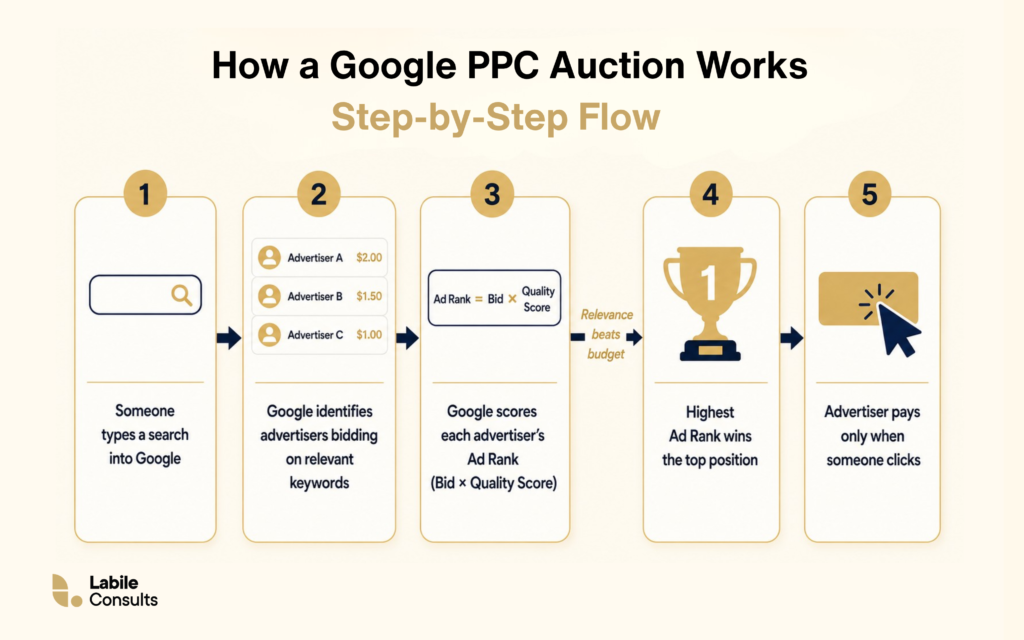
So, how does Google decide which adverts appear first? Every time someone types a search into Google, an auction happens in milliseconds. Google pay-per-click advertising runs on this auction system, and understanding it will help you understand why running ads well is not just about spending more money. If you want a thorough breakdown of every layer of the auction and how match types work, our article on pay-per-click Advertising covers the full mechanism.
Those are the mechanics. But Google pay-per-click is not one single type of ad. The platform features five main campaign types designed for different business objectives.
| Campaign Type | Where Ads Appear | Best For |
| Search | Top of Google search results | Capturing high-intent text searches (e.g., an employment lawyer in Birmingham). |
| Display | Websites across the internet | Visual image banners built for brand awareness and retargeting past visitors. |
| Shopping | Google search results (product images) | Selling physical products online. |
| Video | YouTube before and during videos | Visual ads on YouTube used for product demonstrations and brand storytelling. |
| Performance Max | Across all Google channels | Automated cross-channel campaigns |
Knowing the campaign types helps you choose where to start. The next practical question for any small business considering Google PPC advertising is what it will actually cost.
What Does Google PPC Actually Cost?
There is no single answer to this because the cost depends on your industry, the competitiveness of your keywords, the quality of your ads, and your geographic targeting. But there are useful benchmarks that help you plan.
UK advertisers typically pay between £0.50 and £5.00 per click across most industries on search campaigns. At the lower end, you find local service businesses and less competitive niches. At the higher end, you find legal services, financial services, and insurance, where clicks for competitive terms can cost £10 to £20 or more.
A daily budget of £25 to £50 gives your Google pay-per-click campaign enough data to begin learning and optimising. Running for a minimum of 30 days before drawing conclusions gives the platform enough time to identify patterns in who is clicking and converting.
With that being said, your budget sets the ceiling on your spend, but your conversion rate determines what you actually get for it. A £500 monthly Google pay-per-click advertising budget sending traffic to a landing page that confuses visitors or lacks a clear call to action is money spent producing nothing. This is where conversion rate optimisation, the process of improving your website’s ability to turn visitors into enquiries, comes in.
More importantly, don’t judge a campaign solely by its cost per click. The real measure of success is whether those clicks generate profitable enquiries or sales. The good news is that Google Ads gives you several controls to help improve traffic quality and reduce unnecessary spending from the outset.
3 Safety Filters That Protect Your Ad Budget
Before launching your first campaign, there are three simple settings every small business should configure. These help keep your budget focused on qualified prospects while reducing the risk of paying for irrelevant clicks.
Google Ads offers a great deal of flexibility, but its default settings are designed to maximise reach rather than protect small business budgets. Before launching your first campaign, configure these three simple settings to help keep your spending focused on the people most likely to become customers.
- Enforce a Strict Geographic Radius: Google defaults to targeting broad locations. If you only serve a specific city or radius, change your settings to “Presence: People in or regularly in your targeted locations.” This keeps your budget focused entirely on local leads and blocks clicks from users outside your service area.
- Set a Strict Daily Budget Cap: You control the financial ceiling. By setting a daily cap (like £20 per day), Google’s automated system will pause your visibility the moment you hit that limit. This gives you absolute control and prevents sudden financial surprises overnight.
- Deploy an Active Negative Keyword Shield: Negative keywords tell Google exactly when not to show your ad. Building a defensive list blocks irrelevant searches from wasting your money. If you sell high-end, premium services, instantly add these exclusions to your dashboard:
Google PPC vs Other Digital Marketing Channels
One of the most common questions from business owners new to Google pay-per-click is how it compares to other options, particularly SEO, social media, and Facebook ads.
1. SEO
Although both help businesses increase their visibility on Google, they work in fundamentally different ways. SEO focuses on improving your website’s organic rankings through high-quality content, technical improvements, and effective on-page SEO strategies that help search engines understand and rank your pages. It is a long-term approach that often takes months to produce consistent rankings, but once established, it can deliver a steady stream of traffic without ongoing per-click costs.
Google pay-per-click advertising, by contrast, provides immediate visibility the moment your campaign goes live. However, that visibility lasts only while your budget is active. Most successful businesses use both: paid search to generate immediate traffic while organic optimisation gradually builds sustainable visibility over time.
2. Social Media Advertising
The biggest difference between Google pay-per-click advertising and social media advertising is user intent. Google Ads captures people who are actively searching for a product or service, meaning they already have a need and are looking for a solution.
Social media platforms such as Facebook, Instagram, TikTok, and LinkedIn work differently. Rather than responding to what people are searching for, they show adverts based on users’ demographics, interests, behaviours, professions, or previous online activity, regardless of whether they are actively looking to buy at that moment.
Social media advertising excels at building brand awareness, introducing new products or services, nurturing audiences, and generating demand earlier in the buying journey. As a business owner, you can use paid ads to capture customers who are ready to act and social media advertising to build visibility, engage potential customers, and create demand earlier in the buying journey.
3. Email Marketing
Google pay-per-click helps you attract new customers who are actively searching for a product or service, even if they have never heard of your business before. Email marketing, on the other hand, communicates with people who have already interacted with your business by subscribing to your mailing list, making an enquiry, or becoming a customer. Email marketing helps to maintain long-term engagement with the audience given by paid ads. Email marketing and Google Ads serve different purposes because they reach people at different stages of the customer journey.
4. Content Marketing
Content marketing focuses on creating valuable resources, such as blog articles, guides, videos, or case studies, that educate or solve problems for your target audience. Unlike Google PPC advertising, which delivers immediate visibility as soon as your campaign goes live, content marketing is a long-term strategy that builds trust and authority over time. A well-written article can continue attracting visitors for months or even years without ongoing advertising costs, but it often takes time to gain traction.
Understanding these differences makes it easier to decide when Google PPC advertising should be your primary focus and when it should work alongside other marketing activities.
Google PPC advertising is well-suited to your business when people are actively searching for what you do, when you need results within weeks rather than months, when your offer is specific and can be communicated clearly in a short ad, and when you have a landing page or website page that is built to convert visitors rather than just inform them.
It is less well-suited when your offer is genuinely novel and nobody is searching for it yet, when you are operating in a category with very high keyword costs that your budget cannot sustain, or when your marketing strategy does not yet have the wider foundations in place.
How To Get Started with Google PPC
If this introduction has clarified enough that you want to take the next step, here is a brief outline of what getting started with Google PPC advertising actually involves. For the complete step-by-step walkthrough of setting up and running a campaign, our article on Google Ads for small businesses covers the setup process in full detail.
- Set up a Google Ads account: Free to create at ads.google.com. You will need a Google account, your business information, and a payment method.
- Define your campaign goal: Before choosing keywords or writing ads, be clear on what you want the campaign to achieve. Enquiries, bookings, phone calls, product sales, and website visits are all different goals that require different campaign setups.
- Research your keywords: Use Google’s free Keyword Planner to find the search terms your customers are using. Look for terms that are specific enough to indicate buying intent and have enough search volume to be worth targeting.
- Write your first ads: For a Google Search campaign, you will write up to 15 headline variations and 4 description variations. Google’s system tests different combinations and optimises toward the best performers. Every headline should confirm to the reader that they are in the right place.
- Set your daily budget: Start with what you can afford to spend consistently for 30 days without it causing financial stress. The learning period matters. Campaigns that are switched off after a week provide no useful data.
- Build or designate a landing page: Decide where your ad will send people and make sure that page is clear, fast, and focused on one action. Do not send ad traffic to your homepage unless your homepage is specifically built to convert.
Want Help Running Your First Google PPC Campaign?
At Labile Consults, we help small businesses build Google PPC advertising campaigns grounded in your specific offer, audience, and budget. If you want a set of expert eyes on your setup or a campaign built from scratch that is designed to convert from day one, we are here to help.
Book a free consultation today, and let’s help you win customers using Google pay-per-click advertisement.