
Google Ads can put your business in front of people who are already searching for what you sell. That makes it a useful PPC advertising option for small businesses that want to generate calls, enquiries, bookings, or sales. However, the platform can also spend money quickly. A broad keyword, a weak location setting, a poor landing page, and so on, can use up your budget without bringing in the right customers. Therefore, ensuring your Google ads campaign is carefully set up is what helps you avoid that.
So, this guide explains how to use Google Ads for small business while keeping control of your spending. You will learn how to choose a SMART campaign goal, track valuable actions, set a realistic daily budget, target the right searches, write relevant ads, and improve your results after launch.
The aim is to build a campaign where your keywords reflect what customers are searching for, your ads set clear expectations, your landing page makes the next step easy, and your results help you decide if your ads are working and where to deploy more of your advertising budget.
Before You Start: How Is Google Ads Structured?
Google Ads is easier to manage once you understand how the different parts fit together. Each part controls a different area of your campaign, forming a funnel-like structure, with the “juice” flowing from the top, which is your account, to the bottom, which is your landing page. The image below puts this into better context.
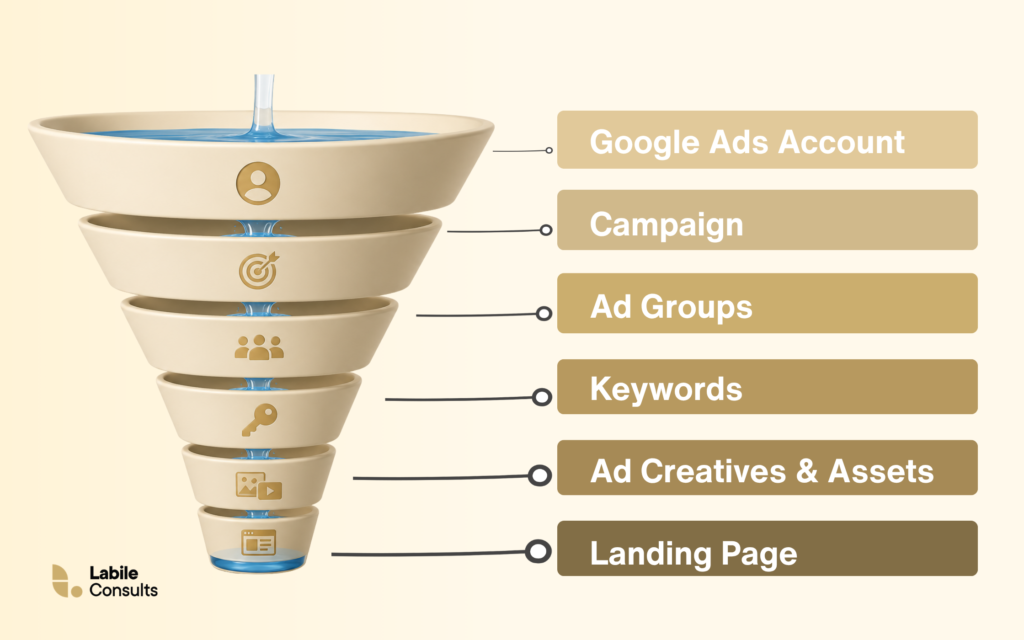
Your account sits at the top. It contains your billing details, user access, conversion tracking, and every campaign you create.
A campaign controls the main settings for a group of ads. This includes the budget, bidding strategy, location targeting, language, and ad schedule. If you want to advertise two services with different budgets or target areas, you may need separate campaigns.
Inside each campaign are ad groups. An ad group brings together closely related keywords and ads. For example, an accountancy firm could have one ad group for bookkeeping services and another for payroll services. This helps each advert match what the person is searching for.
Keywords are the words and phrases you choose to target. These are the words that help Google decide when your ads may be relevant to a search.
Your ads are the messages people see in the search results. They should reflect the keywords in the ad group and clearly explain what your business offers.
The landing page is where someone arrives after clicking your advert. The best landing pages typically continue the same message in your ads, while ensuring the next action is clear, whether that means calling, booking, buying, or completing a form.
How to Set Up Google Ads for Your Small Business
A strong Google ads for small business campaign begins with a clear plan. The steps below will help you set up Google Ads in the right order, ensuring you are primed to smashing your advertising objectives:
Step 1: Decide What You Want the Campaign to Achieve
Choose one main result for your campaign before you start changing settings. Your goal should connect directly to a result that’s most relevant to your business. This could be a phone call, an enquiry form, a booking, a quote request, or an online purchase.
You should also estimate what that result is worth, as this will give you a starting point for deciding how much you can afford to spend. For example, imagine that your average customer brings in £400 in profit and one in every four leads becomes a customer. This means that each lead is worth about £100 to the business, and you would need to generate leads for less than £100 to leave room for a return.
Understand that this figure does not need to be perfect on day one. Instead, it gives you a practical benchmark that you can continue to optimise/improve as you collect real sales data.
So, in summary, write down your main campaign goal and the estimated value of each lead or sale before moving to the next step. These numbers will guide your conversion tracking, bidding strategy, budget, and performance checks later.
Step 2: Set Up Conversion Tracking
Conversion tracking shows what people do after they click your ad. This information, first, helps you see which keywords, ad creatives, and campaigns are producing results, and secondly, guides automated bidding when you choose a strategy that focuses on conversions.
For a Google Ads for small business campaign, the conversion actions you track should match the goal you chose in Step 1 of this guide. A service business may track completed enquiry forms and calls from potential customers, while an online shop may track completed purchases. Also, actions such as viewing a page or clicking a menu can still provide useful information, although they should rarely carry the same importance as a genuine lead or sale.
Below is the step-by-step process to set up conversion tracking in Google Ads:
- Open Goals and select Summary under Conversions.
- Select Create conversion action.
- Choose Conversions on a website.
- Enter your website address and allow Google to scan it.
- Choose the action you want to measure, such as a purchase, contact, booking, or submitted lead form.
- Connect an existing Google tag or Google Analytics property. Google will provide setup instructions when it cannot detect either one.
- Complete the setup and test the conversion yourself. Submit the form, make a test booking, or complete a test purchase, then check that Google Ads records the action.
You may need separate conversion actions when customers can contact your business in different ways. Google Ads can track calls placed directly from an ad, calls to a number on your website, and clicks on a phone number from a mobile device.
You also want to pay close attention to which actions are marked as primary conversions: Primary actions can influence campaign bidding when their conversion goal is selected, and secondary actions remain available for reporting and usually do not guide bidding. For example, you might use completed quote requests as a primary action and brochure downloads as a secondary action. This helps Google focus on the activity that has greater value to your business.
Lastly, do not launch the campaign until you have tested the setup. Broken tracking can make a successful campaign appear unproductive, while tracking minor actions as valuable leads can make weak performance look stronger than it really is.
Step 3: Choose One Product or Service to Advertise
A small budget works best when it has a clear focus. Choose one product or service for your first campaign so you can build the keywords, ads, and landing page around a single customer need. For example, a plumbing company may offer boiler repairs, bathroom installations, drain cleaning, and emergency callouts. However, promoting all of them in one campaign would spread the Plumber’s budget thin across several different searches, and ultimately lead to a failed Google advertisement campaign.
The best offer to start with is usually one that has strong customer demand and a healthy profit margin. You should also consider how quickly your team can respond. A campaign that generates urgent enquiries will only work well when someone is available to answer calls or follow up on forms. This is where knowing how to build a sales plan and team comes in handy.
This focus also improves relevance. Someone searching for an emergency plumber will see an advert about emergency plumbing and arrive on a page about the same service. That consistent message can help a Google Ads for small business campaign attract more suitable clicks and turn more of them into enquiries.
Once the campaign is producing reliable results, you can then create separate campaigns for other products or services; each one can then have its own budget, keywords, ads, and landing page.
Step 4: Choose a Search Campaign
A Search campaign shows your ads when people search on Google for products or services related to your keywords. This makes it a practical starting point for many small businesses because the person already has a need and is actively looking for an answer.
To create a Search Campaign:
- Open Campaigns in your Google Ads account.
- Select the plus icon, and choose New Campaign.
- Select the goal that matches the result you chose earlier.
- Choose Search as the campaign type.
Google may also present options such as Performance Max, Display, Video, and Shopping. Each campaign type serves a different purpose. However, Search Campaign gives you direct control over the keywords you target, the ads you write, and the pages people visit after clicking. And that control is useful when running Google Ads for small business with a limited budget.
Choose the conversion actions you want the campaign to focus on, such as phone calls, enquiry forms, bookings, or purchases. Check these carefully before moving forward, since they tell Google which results matter to your business.
And lastly, give the campaign a clear name that identifies the offer and location. For example, Emergency Plumbing Leeds is easier to recognise than Campaign 1. While the name you give your campaign is subjective, it’s inarguable that clear names will make the account easier to manage, especially when you add more campaigns later.
Step 5: Set a Daily Budget You Can Afford
Start with the amount your business can comfortably spend over a full month. Your campaign needs time to collect useful data, so choose a figure you can maintain without affecting essential business costs.
Google Ads asks you to enter an average daily budget. To calculate it, divide your monthly limit by 30.4, which is the average number of days in a month. For example, a monthly budget of £600 gives you an average daily budget of about £19.74.
Keep in mind that the daily figure is an average. Google may spend more on days when there are stronger opportunities to show your ads. According to Google’s guidance on average daily budgets, most campaigns can spend up to twice the average daily budget on a given day, while the monthly spending limit remains 30.4 times the daily amount. This means a campaign set at £20 per day could spend up to £40 on a busy day, with a usual monthly limit of £608.
Your budget also needs to reflect the likely cost of a click. If clicks in your market cost around £5, a £10 daily budget may bring in only two clicks, which can make it difficult to gather enough data within a reasonable period.
Use keyword planners, such as Google Keyword Planner, Semrush Keyword Magic Tool, and Ahrefs Free Keyword Generator, to find related searches, estimate search demand, and get an idea of what each click may cost. Google Keyword Planner is a useful starting point because its estimates come directly from Google Ads, while Semrush and Ahrefs can help you discover more keyword variations. Compare these estimates with the value of a lead or sale, then choose a budget that gives the campaign enough room to collect useful data.
Increase your spending when the campaign is attracting suitable customers at a cost your business can afford. Google may recommend a higher budget, although your own performance data should guide that decision.
Step 6: Choose the Right Bidding Strategy
Your bidding strategy tells Google how to use your budget when your ad becomes eligible to appear. The main options for a small business are Maximise Clicks, Maximise Conversions, Target CPA, and Manual CPC. Each one gives Google a different instruction, and although Google provides an official guide to choosing a bidding strategy, the right choice largely depends on your campaign goal, the quality of your conversion tracking, and the amount of reliable data in your account.
- Maximise Clicks: Maximise Clicks asks Google to bring as many visitors as possible within your daily budget. Google automatically adjusts your bids based on the available opportunities to generate clicks. This strategy can help a new campaign gather traffic and search data while you confirm that your keywords, ads, landing page, and conversion tracking are working properly. However, Google will focus on the number of clicks rather than the number of leads or sales. You can set a maximum cost per click limit to control how much Google can bid for one visit. Keep this limit realistic, since a very low amount may stop your ads from competing for valuable searches.
- Maximise Conversions: Maximise Conversions asks Google to generate as many tracked conversions as possible within your budget. Google adjusts each bid based on how likely a searcher is to complete an action such as calling, submitting a form, making a booking, or buying a product. The quality of your conversion tracking matters here because when page views, button clicks, or other minor actions are counted as primary conversions, Google may spend your budget finding people who complete those actions even though they are not relevant to your bottom-line. So, make sure the campaign focuses on results that have genuine value to your business.
- Target CPA: Target CPA allows you to tell Google the average amount you would like to pay for each conversion. CPA means cost per action, although many businesses also refer to it as cost per acquisition. For example, if a qualified enquiry is worth £80 to your business, you may decide that paying an average of £35 for each enquiry leaves enough room for profit. Google will then adjust your bids to work towards that target. Setting an unrealistically low target may reduce traffic because Google has fewer opportunities to find conversions at that cost. Also, in some Search campaign settings, Target CPA appears as an optional target within Maximise Conversions rather than as a separate strategy.
- Manual CPC: Manual CPC gives you direct control over the maximum amount you are prepared to bid for a click. You can set one bid for an ad group and choose different bids for individual keywords when needed. However, this control also creates more work. You will need to review keyword costs and performance regularly, then adjust bids yourself. A high bid can spend your budget quickly, while a low bid can limit how often your ads appear.
Step 7: Set Your Location and Ad Schedule
Location targeting controls where your ads can appear, while the ad schedule controls the days and times they can run. Both settings can protect your budget by keeping your Google ads for small business campaign focused on people your business can serve and times when your team can respond.
Start by selecting the cities, towns, postcodes, regions, or countries where your customers are based. A local business should keep this area close to its genuine service area. For example, a cleaning company that works only in Birmingham should avoid targeting the whole of England.
Next, open the advanced location settings and check which people Google can include. The default option may reach people who are in your selected area, regularly visit it, or have shown an interest in it. For a local service campaign, choose Presence: People in or regularly in your targeted locations when you want to focus on people who are likely to be physically within the area. Google explains these options in its guide to advanced location targeting.
You can also exclude locations where you do not want your ads to appear. This can help when your business serves most of a city or region but cannot travel to certain areas. Check the location report after launch to see where clicks and conversions are coming from.
Once your location settings are ready, choose when the ads should run. Google lets you create an ad schedule based on the days and hours that suit your business. A business that relies on phone calls may run ads during opening hours, when someone is available to answer, while a business that accepts online bookings or enquiry forms may keep ads running in the evening, since customers can still complete the next step.
To put it simply, use your business hours as a starting point, then review the results after the campaign gathers data. You may also find that certain days or times generate more enquiries at a lower cost. That information can help you adjust the schedule and direct more of your budget towards the periods that produce better results.
Step 8: Find Keywords with Buying Intent
Keywords are the words and phrases you add to your campaign to help Google understand which searches may be relevant to your ads. Your aim is to find searches that suggest someone is ready to contact a business, request a quote, make a booking, or buy a product.
Start by building keyword ideas around four parts:
- The product or service you offer
- The problem the customer wants solved
- The location you serve
- Words that suggest the person is ready to act
For example, a boiler repair company in Bristol might begin with Boiler repair, broken boiler repair, boiler repair Bristol, emergency boiler repair Bristol, boiler repair quote Bristol.
Also, pay attention to the reason behind each search. Someone searching for “how to repair a boiler” may be looking for instructions. Someone searching for “emergency boiler repair Bristol” is more likely to need a professional immediately. Both searches relate to boilers, although they represent very different opportunities for the business.
Keyword planners, as mentioned earlier – Google Keyword Planner, Semrush, or Aherefs, can help you find related searches and compare search demand. Google Keyword Planner can also provide forecasts based on your keywords, budget, and targeting settings.
Search volume can help you understand how often people search for a phrase, but it should not make the decision for you. A broad keyword may attract more searches while bringing in people with several different needs. A longer and more specific phrase may receive fewer searches, yet give you a clearer idea of what the person wants.
So, in summary, choose a manageable list of keywords that closely match the product or service you selected earlier. You can expand the list after the campaign begins and the search data shows which phrases attract suitable customers.
Step 9: Choose Your Keyword Match Types
Keyword match types control how closely a search needs to relate to your chosen keyword before Google considers showing your ad. Google Ads offers three main options: Broad Match, Phrase Match, and Exact Match, and each one provides a different balance between reach and control. So your choice will affect how many searches you appear for and how closely those searches reflect what you sell.
- Broad Match: Broad Match gives Google the widest scope to find related searches. You enter the keyword without quotation marks or brackets (for example: plumber Bristol), and this keyword may connect your ad with a range of searches that Google considers relevant, even when they use different wording. Broad Match can uncover keyword ideas that you may have missed. And it can also attract searches with weaker buying intent, especially when the campaign has limited conversion data. However, every search that leads to an unsuitable click still uses part of your budget, so this option requires close monitoring. Google also offers a campaign setting that converts all keywords in a Search campaign to Broad Match. This setting works with conversion focused smart bidding, which makes accurate conversion tracking especially important.
- Phrase Match: Phrase Match gives Google more direction while still allowing related searches. For this, you must add quotation marks around the keyword (“emergency plumber”), so your ad can be served to users searching that exact key phrase. Also, your ad may appear for searches that include the meaning of emergency plumber, such as emergency plumber near me. Phrase Match provides a useful balance for a small business that wants to reach variations of a keyword while keeping the campaign focused on a recognisable customer need.
- Exact Match: Exact Match gives you the tightest level of control. While Phrase Match uses quotation marks, Exact Match uses square brackets around the keyword – [emergency plumber Kent]. This makes Exact Match useful for valuable services where you already understand the phrases customers use. Its narrower reach may produce fewer impressions, although the searches can be easier to review and manage.
For a new campaign with a limited budget, start with a manageable mix of Phrase Match and Exact Match keywords. This gives you room to reach useful variations while keeping a closer eye on where your money goes.
Step 10: Add Negative Keywords
Negative keywords stop your ads from appearing for searches that are unlikely to produce a customer. They help you protect your budget by filtering out people whose needs fall outside the product or service you offer.
Imagine that you run a professional cleaning company. Your campaign targets searches related to office cleaning, but your ads begin appearing for phrases such as office cleaning jobs, free office cleaning checklist, how to clean an office, and so on. These searches contain relevant words, yet the people making them are looking for employment, advice, training, or products. Adding terms such as jobs, free, checklist, course, and equipment as negative keywords can prevent many of those searches from triggering your ads, and thus helping you save Google advertising budget. This is why adding negative keywords to your campaign setup is perhaps one of the most important step for every Google ads for small business, especially those with very tight budgets.
Build an initial list by thinking about the searches that sound related to your business while serving a completely different purpose. Common examples may include free, salary, jobs, DIY, reviews, wholesale, and so on. However, understand that your list should reflect your offer. And this is because a business that provides free consultations may still want searches containing the word free. An online course provider would have little reason to exclude course or training. So, review every term in the context of what you sell and how customers describe it. The goal is to remove clear waste while keeping enough room to reach people who genuinely need your product or service.
You can add negative keywords at the ad group, campaign, or account level. Use the ad group level when a term is irrelevant to one group of ads. Use the campaign level when it should be excluded from the entire campaign. And account level negative keywords can cover terms that have no value across several campaigns.
Continue building the list after your campaign launches. The Search Terms report will show the actual searches that triggered your ads. Review it each week, identify queries that are unlikely to lead to a sale or enquiry, and add the unsuitable terms to your negative keyword list.
Step 11: Group Similar Keywords Together
Once you have chosen your keywords, organise them into ad groups based on one product, service, or customer need. This helps you write ads that match what people are searching for and makes the campaign easier to manage.
An accountancy firm, for example, could create separate ad groups for bookkeeping services, payroll services, and self-assessment tax returns. The bookkeeping group could contain phrases such as “bookkeeping services,” “bookkeeper for small business,” and “monthly bookkeeping support” because all of them point to the same service.
Payroll keywords should sit in a different ad group with an advert that speaks directly about payroll support. Someone searching for payroll help should see an advert about payroll and land on a page that explains that service clearly.
Also, avoid placing every keyword in one large ad group because a general advert will struggle to speak clearly to people searching for different things. At the same time, you do not need a separate ad group for every small variation of a keyword. Instead, group phrases together when they share the same intent and can use the same advert and landing page.
A clear structure creates a stronger connection between the search, the advert, and the page that follows. It also makes it easier to see which services are producing results and which ones are using your budget without bringing in customers.
Step 12: Write Your Search Ads
Responsive search ads allow you to provide several headlines and descriptions for the same advert. You can add up to 15 headlines and 4 descriptions, and Google tests different combinations to find messages that suit each search. Since the order can change, every headline should make sense on its own and alongside the others.
Start with relevance. At least one headline should clearly name the product or service the person searched for. If the ad group targets emergency plumbing searches, a headline such as “Emergency Plumber in Leeds” immediately confirms that the advert matches the customer’s need.
After that, give the remaining headlines different jobs. One can mention the location, another can explain the main benefit, and another can provide a reason to trust the business. You can also include a direct call to action. A Leeds roof repairer could use headlines such as “Same Day Call Outs,” “Clear Prices Before Work Starts,” “Local Roof Repairers Available,” “Book Your Repair Today”, and so on.
The rule of thumb is to use each headline to add fresh information. Repeating the same phrase in several fields gives Google fewer useful combinations to test and gives the customer fewer reasons to choose your business.
The descriptions give you more space to explain the offer. Focus on the problem you solve, the experience the customer can expect, and the next step they should take. For example: “Need an urgent plumbing repair in London? Speak with a local engineer and arrange a same day visit.”
This is because specific details usually make an advert more convincing. You could mention response times, years of experience, delivery areas, guarantees, review ratings, or a starting price when these details are accurate and useful to the customer.
Your advert can also help filter out unsuitable clicks. A cleaning company that serves businesses only could say “Commercial Cleaning for Offices.” A consultant with a minimum project fee could mention that starting price. These details may reduce the total number of clicks, while giving the campaign a better chance of attracting people who fit the offer. So, basically, ensure your advert addresses the exact need of your consumer persona and the stage of the buying journey they are.
Lastly, before saving the advert, read every possible headline and description as a customer. Check that the service is clear, the wording matches the keywords in the ad group, and the next action you want them to take is easy to understand.
Step 13: Add Useful Ad Assets
Ad assets give people more information about your advert before they click. They can make your advert more useful, increase the space it takes up in search results, and help customers reach the right page or action faster. And this ideology doesn’t only apply in Google ads for small business; it applies across advertising in general, regardless of the platform – Facebook ads, TikTok ads, X ads, and so on.
Other important ad assets you should consider adding are sitelinks, callouts, structured snippets, call assets, and location assets.
- Sitelinks let you add extra links beneath your advert. A gutter repair company could link to emergency repairs, pricing, and contact details. Each link should lead to a relevant page that helps the customer move forward.
- Callouts highlight short selling points such as free quotes, same day service, no call out fee, or weekend availability. Keep them specific and accurate, as vague phrases such as high quality service add very little because almost every business can make the same claim.
- Structured snippets show a list of services, product types, brands, or other categories. An accountant could use them to display services such as bookkeeping, payroll, tax returns, and company accounts. This helps people understand the range of support available before they visit the website.
- Call assets add your phone number to the advert, which can make it easier for mobile users to contact you. They are useful for businesses where customers often want to speak with someone quickly. However, ensure calls are directed to a number that someone can answer during the hours your ads are running, otherwise, it’s as good as setting your money on fire.
- Location assets connect your advert with your business address and Google Business Profile. They can help local customers see where you are based and get directions.
Of course, you do not need to include all of these in your advert. Choose assets that support the action you want people to take, and continue to review their performance after launch. This way, you know the ones to keep and the ones to remove.
Step 14: Choose/Design the Right Landing Page
The landing page is where someone arrives after clicking your advert. As mentioned earlier in this guide, it should continue the same message your target audience saw in the search results and make the next step easy to complete.
Send each advert to the page that matches the service or product being promoted. An advert for emergency boiler repairs should lead to a page about emergency boiler repairs. Sending that visitor to a general homepage forces them to search for the information they expected to find straight away. And when this happens, your bounce rate will not only skyrocket, it will also cause you to lose valuable ads budget.
The headline should confirm that the visitor is in the right place. Use clear wording that reflects the advert and the search behind it. If the advert promises same day boiler repairs in Coventry, the page should make that service and location immediately clear.
Also, give the page one main action. This could be calling the business, completing a form, requesting a quote, booking an appointment, or making a purchase. Place that action near the top of the page so visitors can see it without scrolling through several sections. A page with multiple actions will only leave an average visitor confused.
If you are using forms for lead generation, ensure they are short and ask only for the details you genuinely need at this stage. A name, phone number, email address, and short message may be enough for an initial enquiry. Longer forms can create extra work for people who are still deciding whether to contact you, and this is one of the bad practices when running Google ads for small business.
Trust signals can help visitors feel more confident about taking the next step. Relevant customer reviews, professional accreditations, clear contact details, guarantees, and examples of completed work can all support the decision. However, do not make your testimonial page overwhelming to your target audience; choose proof that relates closely to the service on the page.
The page also needs to responsive on multiple screens, specifically phone and tablet. Check that the text is easy to read, buttons are easy to tap, forms are simple to complete, and the phone number can be called directly. Test the loading speed as well, since a slow page can lose potential customers before they see your offer.
See your entire setup in this context: a strong landing page makes the journey from search to enquiry feel consistent, the keyword reflects the customer’s need, the advert presents the offer, and the page gives them a clear way to respond.
Step 15: Check the Campaign Before You Launch
Don’t launch blindly. A final review can catch the small mistakes that waste money once the campaign starts running. So, ensure you go through every setting carefully and make sure the campaign still matches the goal you chose at the beginning.
So, ensure you review everything: conversion tracking, your budget, your bidding strategy, locations, language, ad schedule, keywords, negative keywords, and so on. Also, read each advert from the customer’s point of view, and confirm that the service, location, benefit, and next step are all easy to understand. Also check that your ad assets contain accurate information and lead to the correct pages.
Open every landing page on both a computer and a phone. Test the forms, phone numbers, buttons, and booking links. Confirm that the page loads properly and matches the promise made in the advert.
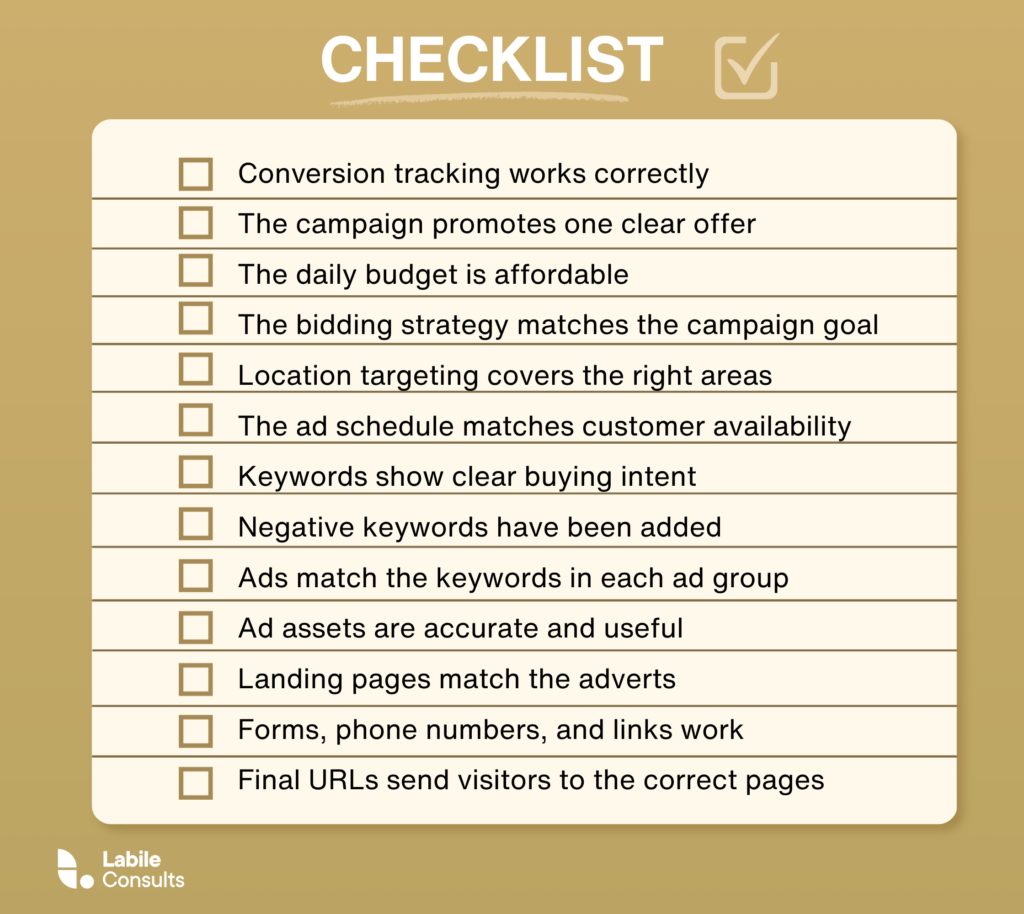
Before you publish, complete this final checklist:
- Conversion tracking works correctly
- The campaign promotes one clear offer
- The daily budget is affordable
- The bidding strategy matches the campaign goal
- Location targeting covers the right areas
- The ad schedule matches customer availability
- Keywords show clear buying intent
- Negative keywords have been added
- Ads match the keywords in each ad group
- Ad assets are accurate and useful
- Landing pages match the adverts
- Forms, phone numbers, and links work
- Final URLs send visitors to the correct pages
Once everything is in place, publish the campaign and monitor it closely during the first few days.
How to Measure Google Ads for Small Business Performance
Campaign performance becomes much easier to understand when you connect advertising data with real business results. Impressions and clicks show how people interact with your ads, while conversions, sales, and lead quality show whether the campaign is helping your business grow. Let’s explore each of them one after the other.
1. Conversions
A conversion is a valuable action completed after someone interacts with your advert. This could be a phone call, an enquiry form, a booking, a quote request, or a purchase. Google Ads uses these actions to measure campaign performance and guide conversion focused bidding strategies.
You need to first check which actions are being counted as conversions before judging the results. A campaign may appear successful when it records several minor actions, such as page views or button clicks, even though very few people contact the business. So, focus your reporting on the actions that have a clear connection to revenue.
2. Cost per Conversion (CPC)
Cost per conversion shows how much you spend, on average, to generate one tracked action.
Cost per conversion = total advertising spend divided by total conversions
For example, a campaign that spends £500 and generates 20 enquiries has a cost per conversion of £25. Compare this figure with the estimated value of a lead or sale that you calculated before launching the campaign. A £25 enquiry may represent good value for a business that earns £300 in profit from each new customer. The same cost may be difficult to sustain when the average customer produces £30 in profit.
3. Conversion Rate
Conversion rate shows the percentage of ad interactions that result in a conversion. For a Search campaign, you can calculate it by dividing conversions by clicks and multiplying the answer by 100.
Conversion rate = conversions divided by clicks multiplied by 100
If 200 people click your ads and 10 complete an enquiry form, your conversion rate is 5 percent. A low conversion rate can point to problems with keyword intent, ad messaging, the offer, or the landing page itself. So, you need to review the full journey before deciding where the problem sits. A useful keyword can still perform poorly when the page loads slowly or asks visitors to complete a long form.
Our guide to setting up and optimising your conversion rate as a small business owner will help you get better at reviewing and “tweaking” primary and secondary conversion actions for your Google ads.
4. Return on Ad Spend (ROAS)
Return on ad spend compares the revenue generated by your ads with the amount spent on them.
Return on ad spend = revenue attributed to ads divided by advertising spend
A campaign that generates £3,000 in revenue from £1,000 in advertising spend has a return on ad spend of 3. This means the campaign produced £3 in revenue for every £1 spent.
Google Ads can report conversion value per cost when revenue or another value has been assigned to conversions. Google calculates this figure by dividing total conversion value by total advertising cost.
Lastly, understand that revenue alone does not show profit, so consider your product costs, staff time, delivery expenses, agency fees, and other operating costs. In other words, your ROAS is not profit. It is simply the amount of money gotten from the ad per pound spent.
5. Lead Quality
Lead quality shows whether the enquiries generated by the campaign are suitable for your business. Google Ads can report how many people completed a form or placed a call, but your sales records will show whether those people became customers.
Track which leads were suitable, which reached the sales stage, and which produced revenue. Speak with the team members who answer calls and follow up on forms, then compare their feedback with the keyword and campaign data.
A keyword that generates four strong enquiries may be more valuable than one that generates twelve weak enquiries. Your final decision should reflect the customers and revenue produced by the campaign, rather than the number of conversions shown in the dashboard.
9 Google Ads Mistakes That Cause Small Businesses to Waste Money
Many Google Ads for small business problems come from small setup choices that seem harmless at first. A campaign may still receive clicks and impressions while the budget quietly goes towards people who are unlikely to become customers. Here are the 10 common Google advertising mistakes many small business owners make:
- Launching Without Conversion Tracking: Without conversion tracking, you cannot see which keywords, ads, or landing pages are producing calls, enquiries, bookings, or sales. You are left judging performance through clicks, which says very little about revenue. I like to say that “what exactly are you marketing if you cannot track your results?”
- Advertising Too Many Services at Once: A limited budget loses focus and potency when it is divided across several products, services, locations, and audiences. Start with one offer, gather useful data, and expand once the campaign produces reliable results. All the best marketing strategies for small businesses are premised on this understanding.
- Choosing Keywords That Are Too Broad: Keywords with high search volume can look attractive, but broad searches often bring mixed intent. Someone may be researching, looking for a job, comparing prices, or trying to solve the problem alone. Specific keywords usually give you a clearer idea of what the searcher wants.
- Forgetting Negative Keywords: Negative keywords help block irrelevant searches before they use your budget. Your starting list will grow over time as the Search Terms report reveals new phrases that do not match your offer. Not using negative keywords is like intentionally leaving your backdoor open, while hoping termites don’t enter into your home.
- Targeting Areas You Cannot Serve: Location settings can reach people outside your main service area when they are left too broad. Check both the locations you include and the location options Google uses to decide who qualifies to be served your ads.
- Sending Every Click to the Homepage: I talked about this, albeit briefly, earlier in this guide. Of course, your homepage may be the best-designed page on your website. However, that same homepage may cover several services, which ultimately gives visitors too many choices. A focused landing page continues the message from the advert and gives the visitor one clear action.
- Measuring Clicks Instead of Customers: A campaign with a high click through rate can still lose money. Judge performance through conversions, cost per conversion, lead quality, sales, and profit.
- Accepting Every Google Recommendation: Some recommendations may improve performance, while others may increase reach or spending. Review each suggestion against your campaign goal, budget, and results before applying it.
- Leaving the Campaign Unchecked: Google Ads needs regular attention. Search behaviour changes, new irrelevant terms appear, and some ads or keywords lose performance over time. A weekly review gives you the chance to catch problems early and move your budget towards the areas producing stronger results.
So, Should You DIY Google Ads for Small Business or Hire an Agency
The real question is, should you hire an agency or keep marketing and advertising in-house. You see, for Google ads, managing it yourself can work when your campaign is simple, your budget is modest, and you have enough time to review performance every week. A local business promoting one service in one area may be able to handle the setup, monitor search terms, add negative keywords, test ads, and track conversions without outside support.
However, the challenge is that Google Ads requires ongoing attention. You need to understand which keywords produce valuable leads, which search terms waste money, whether conversion tracking is accurate, and whether your landing page is helping or hurting results. When you are already managing customers, staff, sales, and daily operations, that work can easily fall behind.
A Google ads agency may be the better option when your account has several campaigns, your market is highly competitive, or your advertising spend is large enough for small mistakes to become expensive. Expert support can also help when your campaign generates clicks without producing suitable enquiries, or when you cannot see where the budget is being lost.
This is where the experts at Labile come in. Book a free consultation today for a proper Google ads review, to help you understand whether your current budget is realistic, which campaign setup suits your goals, and where you may be wasting money before you increase your spend. During the consultation, we can look at your goals, your current account, your conversion tracking, your keywords, and your landing pages, then explain where the strongest opportunities are.
Book a consultation to find out how to use your Google Ads budget more effectively.