
If you run a small business, social media is probably one of those things that sits permanently on your to-do list. You know you should be posting consistently. You know it helps. But between running the actual business and everything else competing for your time, it keeps slipping.
This is why you need the right tools to ease this burden. And I know that using the right tool does not fix inconsistency on its own, but it makes consistency significantly easier, especially when you use it well.
The best social media management tools centralise your planning, take the friction out of scheduling, and give you enough visibility into what’s working to make smarter decisions over time. For a business owner doing this without a dedicated marketing team, that reduction in friction is the entire point.
This guide covers the 10 best social media management tools available in 2026, specifically evaluated for business owners who want to manage social media without an agency or a specialist hire.
Of course, tools are only effective when backed by a solid plan; if you’re still refining your overall approach, exploring the best marketing strategies for small businesses can help ensure your social efforts align with your bigger goals.
If you’re also building your wider digital presence from scratch, our guide on on-page SEO strategies for business owners covers how social media fits alongside your search visibility.
One important note before we begin: these tools are not ranked by quality. They are ranked in order of relevance to where most business owners actually start. The right tool for you depends on the platforms you use, how much time you have, and what you need the tool to do.
The 10 Best Social Media Management Tools for 2026
Use this table as a quick reference when deciding which tool to try first. Pricing is approximate and may vary by region or plan tier; always check the tool’s website for current pricing.
| Tool | Free Plan | Best For |
|---|---|---|
| Buffer | Yes | Beginners |
| Hootsuite | Limited | Power users |
| Later | Yes | Visual brands |
| Metricool | Yes | Data-driven |
| Canva | Yes | Design + post |
| Zoho Social | Trial only | Zoho users |
| CoSchedule | No | Content planners |
| Notion | Yes | Planning only |
| CapCut | Yes | Video creation |
| Meta Suite | Free | FB + IG only |
1. Buffer
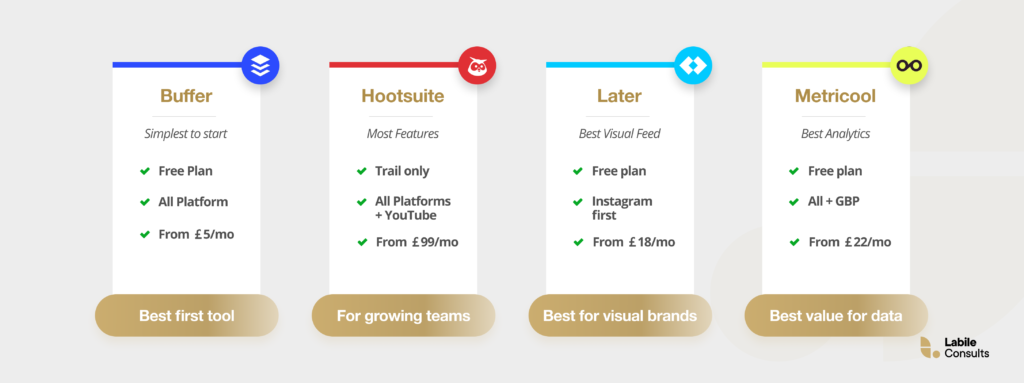
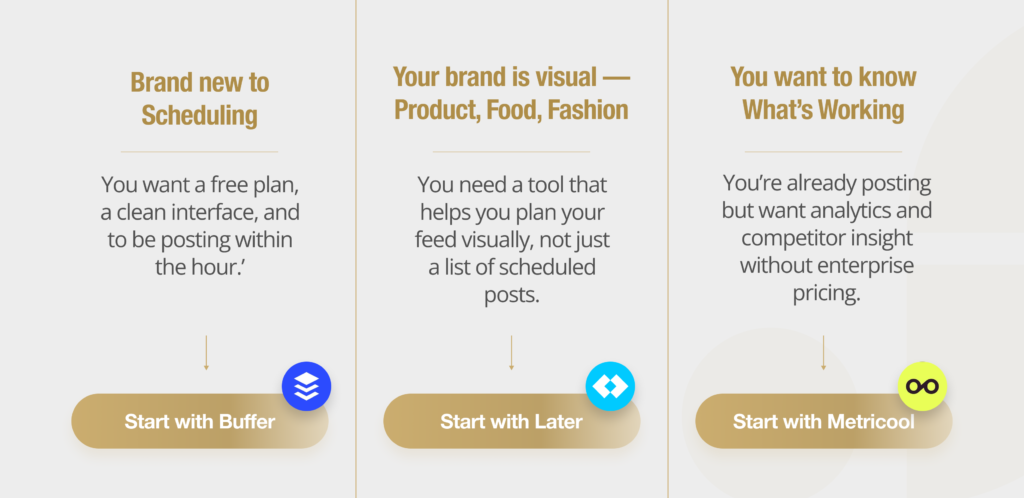
Buffer is the strongest starting point for any business owner who has never used a scheduling tool before. The interface is genuinely one of the cleanest in the industry; you can connect your accounts, write a post, and schedule it in under five minutes with no tutorial required.
And the good news is that the free plan covers three social media profiles and includes basic scheduling, which is enough to establish a consistent posting habit before you commit financially.
What makes Buffer particularly right for you is that it does not overwhelm you with features you will never use. It does the core job, which is to write, schedule, and publish, without asking you to understand an analytics dashboard first. When you are ready for more, the paid plans add engagement tools, analytics, and additional channels at an accessible price point.
2. Hootsuite
Hootsuite is the name most business owners will have heard of before they start researching. That recognition matters; it signals that this is an established, widely used platform with a large support community. It is also the most feature-rich tool on this list, which is both its strength and its limitation.
The honest caveat for a business owner doing this alone: Hootsuite has a steeper learning curve than Buffer or Later, and its pricing has historically been on the higher side for what a solo owner actually uses.
That said, if you want a single dashboard that covers scheduling, social listening, team collaboration, and advanced analytics across multiple platforms, Hootsuite delivers them all with depth and reliability.
3. Later
If your business is product-based, in food and hospitality, fashion, interiors, or any sector where the look of your social feed matters, Later is the most intuitive tool for managing it. The visual content calendar lets you drag and drop images into a scheduling grid and preview exactly how your Instagram feed will look before anything goes live.
This is a genuinely different experience from tools that show you a list of scheduled posts. For business owners who think visually about their brand, the ability to see the aesthetic consistency of their feed in advance removes a layer of anxiety that text-based schedulers cannot.
Later also has strong support for Instagram Stories, Reels, and Pinterest, making it one of the strongest social media tools for business owners in the visual sectors.
4. Metricool
Metricool is the most underrated tool on this list. This comes in handy for a business owner who wants real data about which posts are performing, when your audience is most active, and how you compare to competitors in your space.
Metricool provides analytics that most tools offer only at the enterprise tier, and it does so at a price point accessible to a solo owner.
The free plan is genuinely useful, not a watered-down demo. Competitor analysis is included even on lower-paid tiers. And the scheduling interface is clean and reliable across all major platforms, including TikTok, Pinterest, and Google Business Profile, which very few tools support.
If you are serious about understanding what is working in your social strategy, Metricool is the smartest choice among the best social media management tools at this price point.
5. Canva (with Scheduling)
Most business owners already use Canva for design work, which is fine. It is one of the easiest tools to use for graphic design and video editing, for both newbies and seasoned designers. The templates and the Create with AI features have made content creation easy.
But there is another reason it appears on a list of the best social media management tools: Canva now includes built-in scheduling across major platforms, meaning you can create a post and publish it without ever leaving the platform where you designed it, including emails.
For a business owner who currently designs in Canva and then manually downloads and uploads to each platform, this alone is a significant time-saving. The scheduling functionality is not as sophisticated as Buffer or Metricool, but for someone who prioritises simplicity and already lives in Canva, it removes an entire step from the workflow. The Content Planner feature also provides a monthly calendar view of scheduled content, which helps ensure consistency.
6. Zoho Social / CoSchedule
These two tools serve a similar audience, business owners who want their social media activity to integrate with the rest of how they run their business, but they solve slightly different problems.
Choose Zoho Social if you are already using other Zoho products such as Zoho CRM, Zoho Books, or Zoho Projects. The integration between social media management and your customer relationship data is genuinely useful. With this, you can see how social interactions connect to your pipeline. If you are not in the Zoho ecosystem, the integration advantage disappears, and other tools will serve you better.
Choose CoSchedule if what you actually need is a marketing calendar that shows your social posts alongside everything else you are working on, blog content, email campaigns, product launches, and events. CoSchedule is not just a scheduling tool; it is a content operations platform that helps you see your entire marketing output in one place.
7. Notion
Our list of the best social media management tools would be incomplete without Notion. Now, Notion is not a social media scheduler in the traditional sense as it does not connect to your platforms and publish posts automatically. However, it belongs on this list for a different reason: for many business owners, the bottleneck is not the publishing step, it is the planning step. They do not have a reliable system for deciding what to post, writing it, and organising it before it goes live.
Notion solves that problem. You can build a content calendar template, store your post ideas, draft copy, collect visual assets, and track the status of each piece of content across platforms, all in one place.
Used alongside any of the scheduling tools above, it turns a chaotic content process into a structured one. The free plan is generous, and most business owners will never need to upgrade.
8. CapCut
Video is no longer optional for most businesses on social media. Reels, TikToks, and YouTube Shorts are currently among the highest-reach content formats across almost every platform, and they are increasingly what business owners need to produce to achieve organic growth.
The problem is that video editing has historically required either expensive software or technical skill.
CapCut removes both barriers. It is free, runs on mobile and desktop, and is specifically designed for the short-form video formats that perform best on Instagram, TikTok, and YouTube Shorts.
Templates mean you do not need to start from scratch, and the AI-assisted features like auto-captions, background removal, and text animation produce professional-looking results quickly.
For a business owner creating social video for the first time, CapCut is where to start.
9. Google Analytics
Google Analytics is not a social media management tool in the scheduling sense, but it is arguably the most important tool on this list for a business owner who cares about results rather than vanity metrics.
Every scheduling tool will tell you how many people liked your post. Google Analytics tells you how many of those people visited your website, how long they stayed, and whether they took a meaningful action.
For a business owner, that distinction matters enormously. Engagement metrics on social platforms are easy to optimise for in ways that produce no business outcome. Traffic, time on site, and conversion behaviour are harder to game and much more directly connected to revenue.
When you understand which platforms and which types of content actually drive qualified traffic to your website, you can make better decisions about where to invest your social media effort. The tool is free.
10. Meta Business Suite
Meta Business Suite is free, built by Meta, and every business owner with a Facebook Page or Instagram business account already has access to it. For a business that primarily uses these two platforms and is not ready to pay for a dedicated scheduling tool, it is the most logical starting point.
It covers scheduling, basic analytics, inbox management for both platforms in one place, and ad management. The honest caveat is that the interface is not always intuitive, and Meta updates it frequently, which means the experience can feel inconsistent. But for a business owner who wants to test social media scheduling for a small business without spending anything, it removes every barrier to entry.
Honorary Mentions: When You’re Ready to Scale
The two tools below are industry standards used by established brands with dedicated marketing teams and budgets. They are included here not as recommendations for where to start, but as a preview of where the top end of the market sits and what becomes possible as your business grows.
1. Sprout Social
Sprout Social is the gold standard for brands that take social media seriously as a business intelligence function, not just a publishing platform.
Its social listening capabilities, the ability to monitor what people are saying about your brand, your competitors, and your industry across the internet in real time, are unparalleled at this price point. The reporting is executive-level. The collaboration tools are built for teams, not individuals.
The pricing will likely be a shock for a solo business owner (plans start at several hundred pounds per month), but Sprout Social is the tool many businesses graduate to when they hire a dedicated marketing function. It is worth knowing it exists.
2. Sprinklr
Sprinklr is the final boss of social media management. It is a unified platform used by global enterprises to manage social media, digital advertising, customer service, and market research from a single system. The scale it operates at is genuinely remarkable, and completely irrelevant to most small businesses.
It is included here because understanding what the very top of this market looks like helps you contextualise where the tools you are actually using sit. Sprinklr is what happens when social media management becomes a full enterprise software category.
What to Look for Before You Choose
Most comparison articles list features. This one is written to help you make a decision, which means starting with the questions that actually determine which tool is right for your situation.
The first question is platform fit. Which social media platforms are you actually using or planning to use? Not all tools cover all platforms equally. If your business lives on Instagram and Pinterest, a tool with strong visual scheduling capabilities matters far more than one with powerful X analytics. If you primarily use Facebook and Instagram, Meta’s own free tool may be all you need.
The second question is where you are in your social media journey. If you have never scheduled a post before, you need a tool with a very low learning curve and, ideally, a free plan so you can test it without a financial commitment. If you are already posting regularly and need better analytics or team collaboration, the calculus changes.
The third question is what you want the tool to connect to. Social media scheduling for small businesses works best when it integrates with the other tools you already use. Your design platform, your project management system, or your CRM. A tool that forces you to work in isolation adds friction rather than removing it.
So, Where Do You Start From?
The best social media management tools on this list are only valuable if you use them consistently. Pick one, learn it, and build a posting habit before you consider switching or upgrading. Consistency with a simple tool will always outperform sporadic effort with a sophisticated one.
And when you are ready to manage social media without an agency full-time, but you want a strategy behind what you post, not just a schedule, that is where Labile Consults comes in.
At Labile Consults, we help small businesses and growing brands build that strategy from the ground up. No generic templates. No one-size-fits-all advice. Just clear thinking grounded in your specific market, audience, and growth goals.
Ready to turn your social media accounts into a growth channel for your small business? Book a free consultation today.